
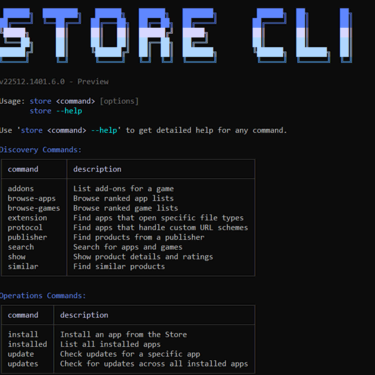
The Microsoft Store now has a command line interface (CLI) where you can browse apps, install and update apps from the Microsoft Store all from the command line. Neat!

“Introducing the Microsoft Store command-line interface
A new command-line interface for the Microsoft Store brings app discovery, installation and update management directly to your terminal. This enables developers and users with a new way to discover and install Store apps, without needing the GUI. The Store CLI is available only on devices where Microsoft Store is enabled.
Key capabilities include:
- Browse apps with store browse-apps : Search and filter the Store catalog by category, subcategory, listing type (top-free, top-paid, new releases), market, language and more.
- Install apps instantly with store install <product-id> : Deploy apps directly from the command line with a single command.
- Update specific apps with store update <product-id> : Install the latest version of any app without navigating through menus.
Learn more by typing
store –help
on the command line.”
The new Store CLI looks to make it easier to script/automate installations and updates from the Microsoft Store.