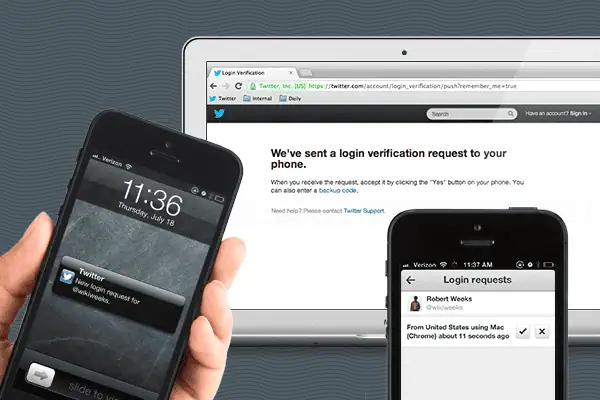
“Today’s Twitter for iOS and Android updates let you enroll in login verification and approve login requests directly from your mobile app. Now, in addition to the SMS-based login verification that we released in May, you can use login verification without relying on text messages.”…….
“As you type your query, the search menu with suggestions will include social context, so you can see how you’re connected to other users. We just introduced this last week on twitter.com.
We’re also adding a new photo gallery in search. Before, when photos were returned in search results, you could swipe through thumbnails and select photos to view full-screen. Now, you can select a new “View more photos” option that will lead you to a photo gallery of all the photos related to that search.”
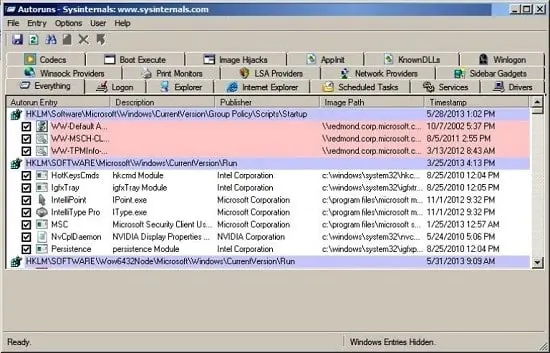
(screenshot of Autoruns for Windows from the Windows Sysinternals site)
What is Autoruns for Windows? It is a valuable tool to look at the various locations where programs can run when Windows boots up or when you login. There are many (many!) locations where programs, including viruses, spyware and malware can surreptitiously install themselves. With Autoruns for Windows, you can view all of the programs that launch during Windows bootup and select which program you want to disable. Obviously, you have to pay attention or you may disable a critical Windows component resulting in a non-booting Windows installation
You can also use it to troubleshoot offline Windows installs, meaning you can take a suspect hard drive with an installation of Windows and disable startup entries on that hard drive.
The Caribbean Telecommunications Union (CTU) has posted a draft version 2.0 of its Caribbean Internet Governance Policy Framework (CIGPF) document for general review and comments.
According to the CTU:
The CIGPF was first issued in 2009 and is the product of inputs, discussions and feedback compiled from the Caribbean Internet Governance Forum (CIGF), a multi-stakeholder group which has been convened annually by the CTU since 2005, initially in conjunction with the CARICOM Secretariat.
The document articulates a vision and mission for Internet Governance in the Caribbean, identifies key focus areas and recommendations for priority policy and operational actions. The CIGPF is intended to be used as a reference for regional governments and regulators in particular and other stakeholders generally, in navigating the increasingly complex world of Internet Governance by identifying appropriate priorities for Caribbean stakeholders.
This new issue of the CIGPF incorporates updates and additions warranted by new developments in this dynamic field and feedback inputs over the past few years. This draft is being posted now in advance of the 9th CIGF to be held in September in Curacao at which all further comments would be collated to enable subsequent official release of Issue 2.0. Key updates in this issue include:
rewording of the statement of Mission for Caribbean Internet Governance to highlight enhanced emphasis on security and lawful use of the Internet.
refinement of the strategic focus areas on infrastructure to reflect current thinking on the need for universal broadband access and development of critical Internet infrastructure
addition of a specific strategic focus area for “Legal Frameworks and Enforcement” (separate from the Internet Content focus area) in recognition of current global thrusts in these areas
new priority recommendations consequential to the above
other general updates required by new information, technology, social developments or prior achievements.
Version 2 of the CIGPF is a marked-up version which highlights amendments made to the first CIGPF in January 2009, with sections shaded in blue indicating either new text or text appropriately relocated within the document.
“I’ve spent about two days with the Leap Motion Controller, a Kinect-like PC accessory that uses infrared sensors to translate the motions of your hands into input for applications. The device I received is one I pre-ordered more than a year ago; I’ve been anxiously awaiting its arrival ever since I saw the first video of the device in action.
The Leap costs $79.99, and for your money you get a tiny little aluminum rectangle. It fits easily in the palm of my hand, and once situated on the desk it’s essentially invisible. There are precisely two external features: the green power LED and its USB port.”
Git (http://git-scm.com/) is a free and open source distributed version control system designed to handle everything from small to very large projects with speed and efficiency. As such, Git to used to manage and distribute the code in many Free and Open Source projects.
This article is inspiring me to consider using Git for our TTCS OSSWIN DVD, the free and open source collection of Free and Open Source software collection for Windows that the Trinidad and Tobago Computer Society makes available for anyone to download.
I’ve been the sole lead maintainer for many years now, and I would like others to help
update the text used to describe the programs
add new programs to the collection with descriptions, screenshots, etc
Microsoft Windows NT was launched on July 27, 1993. The Windows NT core continues to be in use in many Microsoft products, including Windows 8, Windows Phone and Xbox One.
The Telecommunications Authority of Trinidad and Tobago (TATT) has posted the Draft Telecommunications (Universal Service) Regulations for the Republic of Trinidad and Tobago for public comment until August 12 2013.
To quote from the introduction :
Considering the importance of telecommunication services, the concept of universal service was developed. Universal service focuses on facilitating accessible and affordable basic telecommunication services to all citizens of Trinidad and Tobago.
The Authority’s policy considerations in relation to the determination of universal service obligations are set out in the Universal Service Framework for Telecommunications Services in Trinidad and Tobago (“the Framework”), a document which has been subject to two rounds of public consultation. This document seeks to identify the services in respect of which universal service obligations shall apply, set out the Authority’s operational procedures for the Universal Service Fund into which contributors would be bound to contribute a percentage of their revenues and to identify the Universal Service initiatives which would be supported by the Fund.
The purpose of the draft Telecommunications (Universal Service) Regulations 2013 is to provide the necessary legal bases for the operation of the Universal Service Fund and for the imposition of obligations on concessionaires to implement such Universal Service initiatives as may be identified by the Authority.
This guide explains how policy advice is developed within the At-Large Advisory Committee (ALAC), why it is important to the end-user, and how you can make your voice heard within that process.
Download the Beginner’s Guide to Policy Advice in the ALAC at
Each meeting on http://durban47.icann.org/full-schedule has a link to aseparate meeting page (for example, the ALAC and Regional Leadership Working Session 1 meeting at http://durban47.icann.org/node/39587 ) has remote participation details and the agenda that allows anyone with a broadband connection to attend the live sessions and participate.
Note that the times of meetings are listed in the local time in Durban which is UTC/GMT +2 hours. This means that the time in Durban is 6 hours ahead of the time in Trinidad and Tobago. This means that a time of 2pm local time in Durban is 8am in Trinidad and Tobago
The Trinidad and Tobago Computer Society (TTCS) is involved in ICANN At-Large. At-Large is the name for the community of individual Internet users who participate in the policy development work of ICANN. Currently, the vice chair of TTCS, Dev Anand Teelucksingh serves on the At-Large Advisory Committee (ALAC) which provides advice on ICANN activities as it relates to the interests of the individual internet end users. The agendas of all the At-Large meetings can be found at
According to the latest Adobe Security Bulletin dated July 9 2013, Adobe has released updated versions of its Adobe Flash Player on various platforms, specifically for:
Adobe Flash Player 11.7.700.224 and earlier versions for Windows,
Adobe Flash Player 11.7.700.225 and earlier versions for Macintosh,
Adobe Flash Player 11.2.202.291 and earlier versions for Linux,
Adobe Flash Player 11.1.115.63 and earlier versions for Android 4.x,
Adobe Flash Player 11.1.111.59 and earlier versions for Android 3.x and 2.x.
to “address vulnerabilities that could cause a crash and potentially allow an attacker to take control of the affected system”.
You can read the Adobe Security Bulletin at http://www.adobe.com/support/security/bulletins/apsb13-17.html but the vulnerabilities in versions of Adobe Flash before July 9 2013 could allow for execution of unwanted code (typically malware), without your consent just by visiting a website with malicious Flash applications or video (SWF). Therefore, you should update your Adobe Flash Player to the latest version to close this loophole.
Windows users should note that the Flash Player in v9 and earlier versions of Microsoft Internet Explorer v9 and the one in web browsers like Opera, Mozilla Firefox and Safari are separate installs. You should install and update both versions of Adobe Flash.
Internet Explorer v10 (for users for Windows 7 Service Pack 1 and Windows 8) has Adobe Flash Player built-in and users should update to the latest Internet Explorer 10 browser version.